
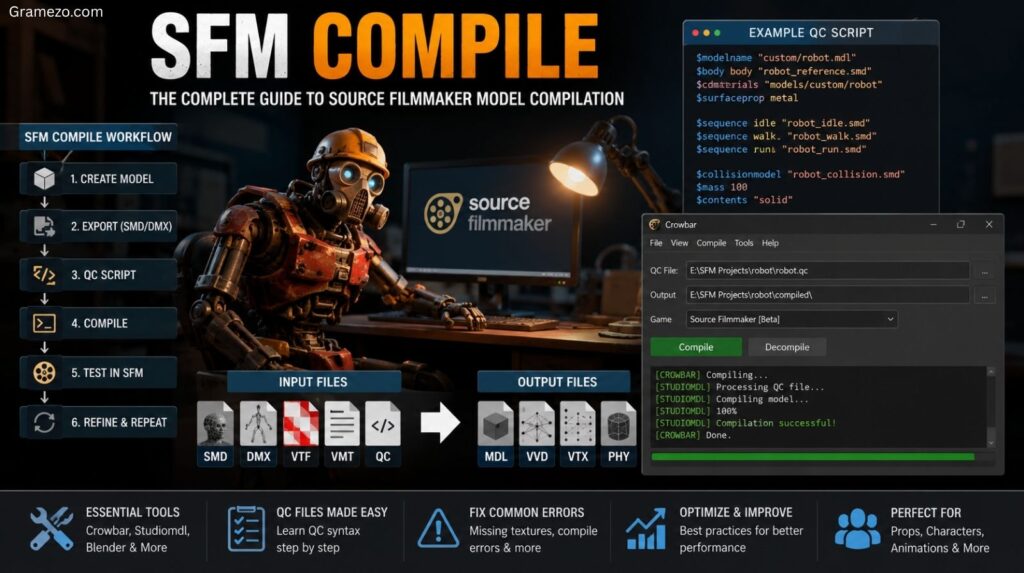
If you’ve spent any time creating custom content for Source Filmmaker, you’ve probably encountered the term SFM compile. At first glance, it sounds technical and intimidating. In reality, it’s simply the process that transforms raw project files into assets that the Source Engine can actually understand and use.
Whether you’re building custom characters, importing props from Blender, creating animation-ready models, or modifying existing game content, understanding the compilation process is one of the most valuable skills you can learn.
Without compilation, your model remains nothing more than a collection of source files. After compilation, it becomes a fully functional asset that can appear inside Source Filmmaker complete with materials, animations, physics, hitboxes, and rendering support.
This guide explains everything you need to know about Source Filmmaker compile workflows, including the tools involved, the role of QC files, common errors, optimization techniques, and professional workflows used throughout the Source modding community.
What Does SFM Compile Mean?
At its core, SFM compile refers to converting raw 3D assets into Source-compatible files that can be loaded and rendered by the Source Engine.
When artists create models in software such as Blender, Autodesk Maya, or 3ds Max, those models exist in formats the Source Engine cannot directly read. Before the engine can use them, those assets must pass through a structured asset compilation process.
Think of it like translating a document into another language.
A model created in Blender contains geometry, materials, rigging data, and animations. The Source Engine speaks an entirely different language. The compiler acts as the translator.
The final result becomes a collection of optimized files that Source Filmmaker can recognize.
Common outputs include:
| File Type | Purpose |
|---|---|
| MDL Files | Main model definition |
| VVD Files | Vertex information |
| VTX Files | Rendering data |
| PHY Files | Physics information |
| VTF Files | Texture storage |
| VMT Files | Material definitions |
These files collectively form the finished package used by Source Filmmaker.
Why Compilation Is Necessary
Many beginners wonder why they can’t simply import an FBX or Blender file directly into Source Filmmaker.
The answer lies in how the Source Engine was designed.
Valve built the engine around a specialized asset pipeline. Every model must follow strict engine conventions regarding:
- Geometry
- Materials
- Bone structures
- Physics
- Animation playback
- Rendering optimization
Compilation ensures all assets follow those requirements.
Without compilation:
- Models won’t load
- Textures won’t appear
- Animations may fail
- Physics won’t work
- Performance can suffer dramatically
The compiler validates the asset and converts it into an optimized format suitable for real-time rendering.
How the Source Filmmaker Compilation Pipeline Works
Understanding the full compile workflow helps eliminate confusion later.
The process generally follows this sequence:
3D Modeling
      ↓
UV Mapping
      ↓
Rigging
      ↓
Exporting SMD/DMX
      ↓
QC Script Creation
      ↓
Compiler Execution
      ↓
MDL Generation
      ↓
Testing in SFM
      ↓
Refinement
Every stage contributes important information to the final model.
A problem introduced during modeling often becomes visible during compilation.
Likewise, errors in materials, animations, or file paths usually appear during testing.
Professional creators constantly follow a simple rule:
Compile, test, fix, and repeat.
Essential Tools Required for SFM Compile
Several tools make up the modern SFM asset workflow.
Each serves a specific purpose within the asset creation pipeline.
Source Filmmaker
The first requirement is obviously Source Filmmaker itself.
Developed by Valve, SFM uses Source Engine technology and serves as the final destination for your compiled assets.
Everything you create ultimately gets tested here.
Studiomdl
Studiomdl is the official model compiler used by the Source Engine.
This command line utility takes your source files and converts them into finished engine assets.
Its responsibilities include:
- Reading QC files
- Processing SMD files
- Processing DMX files
- Generating MDL files
- Creating physics data
- Building rendering information
Without Studiomdl, there is no actual compilation.
It is the heart of the entire system.
Crowbar
Most modern creators use the Crowbar tool instead of working directly with command-line operations.
The Crowbar compiler provides a user-friendly interface for:
- Compiling models
- Decompiling models
- Managing QC scripts
- Running Studiomdl automatically
For beginners, Crowbar dramatically simplifies the process.
The tool also functions as a model decompiler, allowing creators to study existing Source Engine assets.
Blender
Today, Blender SFM workflows dominate the community.
Blender offers:
- Professional modeling tools
- Advanced rigging features
- Animation support
- UV editing
- Export plugins
Since Blender is free and powerful, it’s the most common choice among SFM creators.
Autodesk Maya and 3ds Max
Professional studios often use:
- Autodesk Maya
- 3ds Max
These packages provide advanced character creation tools and remain popular in commercial game development.
Their export pipelines are highly compatible with Source Engine workflows.
Text Editors
Since QC syntax is text-based, creators need a reliable editor.
Popular choices include:
- Notepad++
- Visual Studio Code
- Sublime Text
These editors make writing and debugging QC scripts significantly easier.
Understanding QC Files in SFM Compile
Among all Source Engine assets, few files are as important as QC files.
A QC file acts as a set of instructions for the compiler.
Rather than containing geometry itself, it tells Studiomdl how to build the model.
Think of it as a blueprint.
What Is a QC Script?
A QC script defines:
- Model names
- Material locations
- Animation sequences
- Collision models
- Body groups
- Physics definitions
Without a QC file, Studiomdl has no idea how to process your model.
Basic QC Example
$modelname "custom/robot.mdl"

$body body "robot_reference.smd"

$cdmaterials "models/custom"

$surfaceprop metal

$sequence idle "robot_idle.smd"
Although simple, this script contains critical information.
The compiler reads these commands and generates the finished model accordingly.
Important QC Commands
Some commands appear in nearly every project.
| Command | Purpose |
|---|---|
| $modelname | Defines model location |
| $body | References mesh data |
| $sequence | Animation setup |
| $cdmaterials | Material folder |
| $surfaceprop | Surface behavior |
| $collisionmodel | Physics model |
| $lod | Level-of-detail setup |
Mastering these commands significantly improves your ability to troubleshoot problems.
Preparing Assets Before Compilation
Compilation success starts long before Crowbar or Studiomdl enters the picture.
Most compile errors originate during asset creation.
Model Preparation
Your geometry should be clean and organized.
Avoid:
- Duplicate vertices
- Broken normals
- Open meshes
- Unnecessary polygons
A well-structured model compiles faster and performs better.
UV Mapping
Proper UV mapping ensures textures display correctly.
Poor UV layouts often lead to:
- Texture stretching
- Misaligned materials
- Distorted surfaces
Before exporting, verify every UV island is properly arranged.
Rigging Process
Character models require a proper bone hierarchy.
The rigging process determines how animations affect the mesh.
Common rigging mistakes include:
- Unweighted vertices
- Missing bones
- Invalid parenting
- Skeleton mismatch issues
Even a small rigging error can cause major animation failures.
Material Assignment
Every model needs proper material assignments.
This includes:
- Texture references
- Shader settings
- Material paths
Source Engine relies heavily on correct path configuration.
Incorrect directories often generate missing textures during testing.
Step-by-Step SFM Compile Process
Now let’s examine the actual workflow.
Step 1: Create the Model
Begin inside your preferred 3D modeling software.
This could be:
- Blender
- Maya
- 3ds Max
Create:
- Character models
- Prop models
- Environment assets
The model should be finalized before export.
Step 2: Export Source Files
Next comes model export.
Common formats include:
- SMD files
- DMX files
These formats store:
- Mesh data
- Skeleton information
- Animation data
Most creators rely on specialized export plugins.
Step 3: Build the QC File
Create your model configuration.
Define:
- Material locations
- Animation sequences
- Physics definitions
- Body groups
A clean QC file dramatically improves workflow efficiency.
Step 4: Configure Materials
Prepare:
- VTF files
- VMT files
The material system tells Source Engine how textures should appear.
Incorrect setup often causes:
- Purple textures
- Checkerboard textures
- Invisible materials
Also Read: Coolkingzone com: Why This Multi-Topic Digital Platform Is Quietly Dominating Online Attention
Step 5: Run the Compiler
Launch:
- Crowbar
- Studiomdl
Begin compiler execution.
The compiler reads all assets and creates the final output.
Step 6: Analyze Compile Logs
Never ignore compile logs.
These logs contain:
- Compiler warnings
- Compile errors
- Missing references
- File path errors
Reading logs carefully saves countless hours of troubleshooting.
Step 7: Test in Source Filmmaker
Perform compile testing.
Load the model into your SFM project.
Check:
- Materials
- Bones
- Physics
- Animations
- Facial controls
Step 8: Refine and Recompile
Rarely does a project work perfectly on the first attempt.
Professional workflows rely on constant iteration.
Test.
Fix.
Compile again.
Repeat.
Understanding SFM Compile Output Files
After successful compilation, several files appear.
Each serves a different purpose.
MDL Files
MDL files represent the final model definition.
SFM loads these files when spawning models.
VVD Files
Store vertex information.
These files contain optimized geometry data used during rendering.
VTX Files
Handle hardware-specific rendering structures.
Without them, models cannot render properly.
PHY Files
Contain collision and physics information.
These files enable:
- Ragdolls
- Collision detection
- Physical interactions
VMT Files
Define materials.
These files specify:
- Shaders
- Texture locations
- Surface properties
VTF Files
Store texture information in a Source-compatible format.
They are essential for proper visual appearance.
Common SFM Compile Errors and Their Fixes
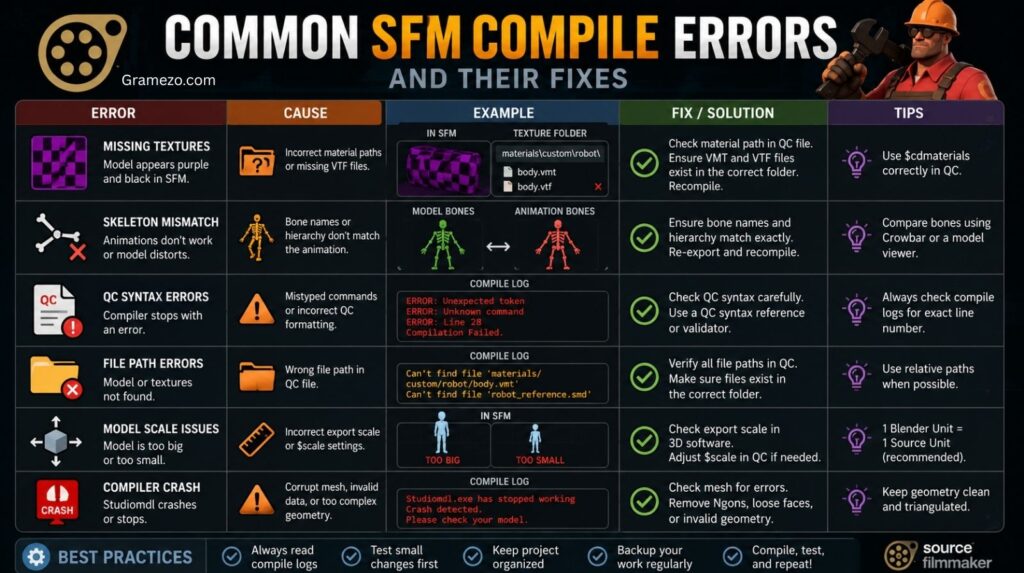
Even experienced artists encounter problems.
Fortunately, most errors follow predictable patterns.
Missing Textures
Symptoms:
- Purple textures
- Checkerboard textures
Cause:
Incorrect material paths.
Fix:
Verify all VMT files reference valid texture locations.
Skeleton Mismatch
Symptoms:
- Broken animations
- Distorted mesh deformation
Cause:
Bone hierarchy differences between model and animation.
Fix:
Ensure both assets use identical skeleton structures.
File Path Errors
Symptoms:
- Missing models
- Failed compilation
Cause:
Incorrect folder references.
Fix:
Double-check every directory path in your QC file.
QC Syntax Errors
Symptoms:
Compilation stops immediately.
Cause:
Invalid commands or formatting mistakes.
Fix:
Carefully review QC syntax line by line.
Compile Crashes
Symptoms:
Compiler exits unexpectedly.
Cause:
Corrupted source data or invalid references.
Fix:
Inspect logs for the exact failure point.
Best Practices for Successful SFM Compilation
Successful creators follow consistent habits.
Keep Projects Organized
Strong project organization prevents confusion.
A common folder structure looks like this:
Project
│
├── Models
├── Materials
├── Textures
├── Animations
├── QC
└── Exports
Everything becomes easier to locate.
Use Version Control
Large projects benefit from version control.
Even simple backups can prevent catastrophic losses.
Many creators maintain multiple compile versions throughout development.
Optimize Models
Good model optimization improves performance.
Focus on:
- Polygon count reduction
- Efficient UV layouts
- Texture optimization
A low polygon model often performs better than an unnecessarily complex one.
Test Frequently
Waiting until the end to compile is a mistake.
Frequent testing catches issues early.
Small fixes are easier than rebuilding entire assets.
Also Read: Truzio Explained: The Smartest Way To Drive Digital Transformation And Business Growth In 2026
Advanced SFM Compile Techniques
Once you understand the basics, advanced features become accessible.
Facial Flexes
Facial systems enable:
- Lip syncing
- Expressions
- Emotion control
These rely on shape keys and specialized compile settings.
Body Groups
Body groups allow multiple variations within one model.
Examples include:
- Different helmets
- Alternate weapons
- Clothing options
This reduces asset duplication.
LOD Models
Level of detail models improve performance.
Instead of rendering a high-resolution model at all distances, the engine swaps to simpler versions.
Benefits include:
- Faster rendering
- Better scene performance
- Reduced memory usage
Collision Models
Collision models control physical interactions.
Proper collision detection improves realism while reducing computational overhead.
Animation Blending
Advanced creators often implement:
- Multiple animation sequences
- Layered motion systems
- Smooth transitions
Proper setup enhances animation quality dramatically.
SFM Compile vs Model Decompile
Many users confuse compilation and decompilation.
They are opposite processes.
| Feature | Compilation | Decompilation |
|---|---|---|
| Purpose | Build assets | Extract assets |
| Input | Source files | Compiled models |
| Output | MDL package | Editable files |
| Tool | Studiomdl | Crowbar tool |
| Usage | Creation | Analysis |
A model decompiler allows creators to examine existing assets.
Studying decompiled models is one of the fastest ways to learn Source Engine conventions.
Beginner’s Guide to Learning SFM Compile
Starting small produces better results than jumping into complex characters immediately.
Begin with a simple prop.
A crate.
A barrel.
A lamp.
These assets teach the fundamentals without introducing advanced rigging challenges.
Next, learn how QC files work.
Understanding QC scripts unlocks nearly every aspect of the Source Engine pipeline.
After that, explore existing reference models from the community.
Many creators learn by examining decompiled assets and comparing configurations.
Over time, you’ll recognize recurring patterns.
Compilation becomes far less mysterious.
Real-World Uses of SFM Compile
The Source modding community relies on compilation every day.
Creators use it for:
- Character creation
- Weapon development
- Animation production
- Machinima projects
- Fan films
- Community mods
A custom character imported into Source Filmmaker begins as a standard 3D model.
Compilation transforms it into a fully functional engine asset.
Similarly, props and environment assets must pass through the same process before they become usable.
Without compilation, custom asset creation simply wouldn’t exist within the Source ecosystem.
Professional SFM Compile Workflow Used by Experienced Creators
Professional artists rarely treat compilation as a final step.
Instead, they integrate it throughout the entire game development pipeline.
Their workflow typically follows this structure:
| Stage | Goal |
|---|---|
| Asset Creation | Build model |
| Export | Generate SMD or DMX |
| Compilation | Create engine files |
| Asset Verification | Check functionality |
| Optimization | Improve performance |
| Retesting | Validate changes |
| Packaging | Prepare release |
Notice how testing appears multiple times.
This iterative approach dramatically reduces debugging time.
Also Read: TheLaptopAdviser Expert Gaming Reviews 2026: Real Performance Or Just Hype? (Complete Guide)
Is SFM Compile Still Relevant in 2026?
Despite newer technologies, the answer remains yes.
Source Filmmaker still maintains an active creator base.
Thousands of artists continue producing:
- Short films
- Animations
- Community content
- Custom character projects
The underlying Source Engine assets still depend on traditional compilation workflows.
While Source 2 introduced new systems, it does not eliminate the need for asset preparation and conversion.
For anyone working with Source Filmmaker today, understanding SFM compile remains a foundational skill.
In many ways, it’s the bridge between creativity and functionality.
Without it, models remain unfinished concepts.
With it, they become living assets ready for animation, rendering, and storytelling.
Conclusion
Understanding SFM compile is essential for anyone serious about working with Source Filmmaker. The process converts raw 3D assets into optimized Source-compatible files that the Source Engine can load, render, and animate. While the workflow may seem complex at first, it follows a logical structure built around asset preparation, QC files, Studiomdl, material configuration, and thorough testing.
The key to success isn’t memorizing every command. It’s understanding how the entire asset pipeline fits together. Once you learn how SMD files, DMX files, VMT files, VTF files, and MDL files interact, troubleshooting becomes much easier. Compile logs start making sense. Errors become predictable. Solutions become faster.
Whether you’re creating custom models, importing assets from Blender, building character rigs, or producing animations for an SFM project, mastering the compilation process opens the door to far more creative freedom.
Start with simple assets. Learn QC scripting. Study reference models. Compile often. Test constantly.
Before long, you’ll be building professional-quality Source Engine content with confidence.
FAQs
What is SFM Compile used for?
SFM compile converts source assets such as models, textures, and animations into formats that Source Filmmaker and the Source Engine can use.
Which software is required to compile models for SFM?
Most creators use Crowbar, Studiomdl, Blender, and a text editor for QC scripting.
What file formats does SFM compile support?
The most common source formats include SMD files and DMX files, while output formats include MDL, VVD, VTX, and PHY files.
What does a QC file do?
A QC script instructs the compiler how to process models, materials, animations, body groups, and physics settings.
Why does my compiled model appear invisible?
This often results from incorrect material assignments, broken QC references, invalid mesh exports, or file path errors.
Why are my textures showing as purple and black?
Purple-and-black checkerboard patterns usually indicate missing textures, broken material paths, or incorrectly configured VMT files.
Can beginners learn SFM compiling without programming experience?
Yes. While QC scripting uses commands, it doesn’t require traditional programming knowledge. Most beginners learn the basics quickly through practice.
What is the difference between Crowbar and Studiomdl?
Studiomdl performs the actual compilation. Crowbar provides a graphical interface that simplifies the process and adds decompiling functionality.
Does SFM Compile work with Source 2 assets?
Not directly. Source Filmmaker uses the original Source Engine asset format. Source 2 assets typically require conversion before use.
How long does the compilation process usually take?
Simple props may compile in seconds. Complex character models with animations and physics can take several minutes depending on asset complexity.
Can I compile custom animations and facial rigs for SFM?
Yes. The compilation system supports custom animation sequences, facial flexes, phonemes, and advanced rigging setups.
What is the easiest way to troubleshoot compile errors?
Read the compile logs carefully. Most issues stem from missing files, incorrect QC syntax, broken material paths, or skeleton mismatches. The logs usually point directly to the problem.
Discover More Articles
- Best Pasticho Venezuelan Lasagna Near Me – Complete 2026 Guide To Finding Authentic Creamy Comfort Food
- Geometry Learn V3: The Complete 2026 Guide To Shapes, Angles, And Real-World Geometry That Finally Makes Sense
- Mastering Your Health: The Power Of Supplement Management with TheSpoonAthletic (Complete Guide 2026)
- Minecraft PlayBattleSquare: Tips, Tricks, And Community Fun (Complete Guide 2026)
Read more knowledgeable blogs on meezvo.com

Kiara Connah is an expert blogger focused on Grammar Guides and Grammar Tips, providing clear explanations, practical examples, and easy-to-follow advice to help writers, students, and professionals improve accuracy, clarity, and confidence in their writing.